Introduction
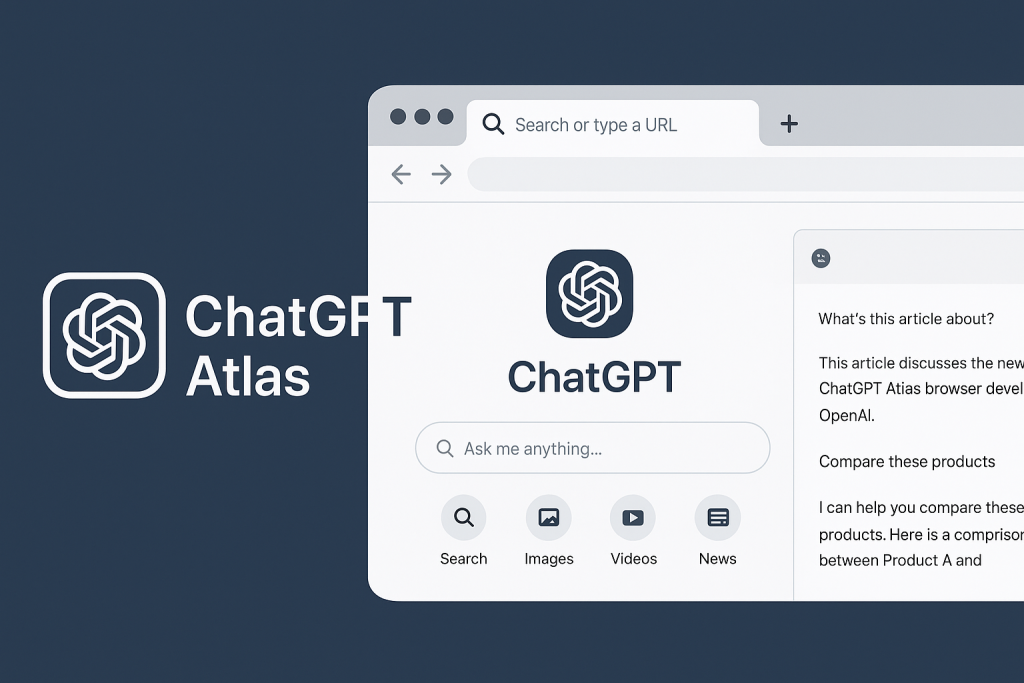
In a bold move that signals a new chapter for the web, OpenAI has unveiled ChatGPT Atlas, a full-fledged web browser built around its flagship chatbot, ChatGPT. Rather than treating AI as an add-on or extension, Atlas embeds ChatGPT at the core of the browser experience letting you chat, search, analyze, and act without ever leaving your tab.
For tech watchers, content professionals and students alike, this launch raises important questions: What does it mean when the browser itself becomes an AI assistant? How might this change workflows, privacy, search behaviour and more? Let’s dig in.
What is ChatGPT Atlas?
At its heart, Atlas is a Chromium-based browser (hence familiar tab/bookmark features) enhanced by a deep integration with ChatGPT. Key components:
- Built-around ChatGPT: From the moment you open a new tab, you’re presented with the ChatGPT interface: ask questions, jump to URLs, access search links, images, videos and news all in one.
- Sidebar / Context chat: As you browse a webpage, a sidebar lets you ask “What’s this article about?”, “Compare these products”, or “Rewrite this paragraph” ChatGPT sees the current page context and responds.
- Agent mode: A standout feature for paid tiers. Here ChatGPT can take actions on your behalf: opening tabs, filling out forms, placing orders, doing research.
- Browser memories & personalization: With your consent, Atlas can remember details of pages you’ve visited, your browsing flows, to provide smarter suggestions and a more tailored experience.
- Cross-platform forthcoming: At launch (October 21, 2025) the browser is available on macOS globally; Windows, iOS and Android are “coming soon.”

Why it matters
1. A browser turned assistant
Traditional browsers (e.g., Google Chrome, Mozilla Firefox) are portals to the web: you search, click, tab, switch apps. Atlas attempts to collapse that workflow by embedding the assistant into the browsing experience. As TechCrunch puts it: “a major step in the company’s quest to unseat Google as the main way people find information online.”
2. Search & discover redux
By framing browsing and searching around ChatGPT, OpenAI is implicitly challenging Google’s dominance in search. With 800 million+ ChatGPT users already in place (per OpenAI’s public comments) and a new entry point to the web beyond the standard search-engine paradigm, the implications are big.
3. Task automation & productivity
“Agent mode” is more than a novelty: imagine asking “Plan a holiday in Kampala for 3 days under $500” and watching ChatGPT open tabs, compare flights/hotels, add items to carts, prepare itinerary — all within the browser. For education and professional use this is a step toward “delegate the tedious, focus on the creative”.

4. Privacy, data-control and risks
With great power comes lots of scrutiny. Atlas introduces features like browser memories which could raise concerns about how much the assistant knows about you and your behaviour. OpenAI emphasises full control. You can clear history, toggle memory, use incognito mode, and the default is no browsing data used for training.
There are also broader implications: if the browser begins to steer your experience based on remembered contexts, what does that do for discovery, diversity of content, and independent thought? Some critics already raise these questions.
Key features in depth
ChatGPT inside every tab

Rather than opening ChatGPT separately, Atlas lets you summon the assistant in the tab you’re on. Highlight text, click into a field, ask ChatGPT to “rewrite”, “summarize”, “translate” or “explain” the content on your screen.
Cursor Chat & inline assistance
If you’re drafting an email or writing a report, you can ask ChatGPT to edit, polish or restructure directly in the browser field. This inline assistance removes friction from “browser → copy → ChatGPT → paste back”.
Agent Mode: action-oriented AI
In preview today for Plus/Pro/Business users, Agent Mode allows ChatGPT to take initiative: open pages, click buttons, create purchase lists, research comparisons, book appointments. Of course user oversight is crucial.
Memory & personalization
With memory turned on, Atlas remembers your browsing patterns and can surface helpful follow-up actions: e.g., “I noticed you looked at job postings last week, want a summary of role types across industries?” But it’s opt-in.
Privacy & controls
OpenAI builds in features such as: incognito mode that logs out ChatGPT, ability to clear specific pages or full history, ability to turn off memory or restrict what ChatGPT can see. Addresses the “AI sees everything I do” worry.

Pros & cons (for students, professionals, general users)
Pros
- Workflows speed up: research, summarise, write, edit, all inside the browser.
- Lower friction: no need to juggle multiple apps or tabs.
- Deep integration: context-aware assistance may surface insights (e.g., flagging related content you missed).
- For learners: the ability to ask “Explain this section of the article I just opened” is huge.
- Productivity boost: agent mode can automate repetitive tasks (e.g., “find 5 sources about X”, “build bibliography”).
Cons / potential pitfalls
- Platform-lock-in: currently macOS only; Windows/iOS/Android delayed.
- Learning curve: users must trust and understand the AI-embedded experience.
- Privacy/tracking concerns: although opt-in, memory features mean more data is accessible to the assistant.
- Search & information bias: potential for the assistant to guide you toward what it thinks you want, rather than broad exploration.
- Subscription model: some features (agent mode) are limited to paid tiers.
- Competitive ecosystem: browsers anchored on Chrome engine already, user habits are entrenched.
What this means for the web ecosystem
- For publishers: If users increasingly rely on AI-embedded browsers instead of traditional search/links, traffic models may shift, summarised content vs click-throughs become more important.
- For SEO/digital marketing: Understanding how AI browsers will treat content (what they summarise, what they highlight) becomes critical.
- For student workflows: Tooling evolves from “open browser → search → gather → summarise” to “open intelligent workspace → ask assistant”.
- For browser market competition: Chrome, Edge, Safari will likely accelerate AI integrations; the browser becomes not just UI but an assistant platform.
Final Thoughts
With ChatGPT Atlas, OpenAI isn’t just launching another browser, it’s signalling a shift: from browsers as passive windows to the web, to browsers as active assistants. For some users, this means more seamless workflows, less task-fragmentation, and more power within your browser. But with that power comes responsibility: choosing how much of your data the assistant should know, remaining critical of what it surfaces, and staying aware that the tools still reflect the biases and design of their makers.
If you’re ready to take it for a spin, Atlas is available now for macOS (Free, Plus, Pro & Go tiers) and Windows/iOS/Android are on the way.
For TechReft readers, this launch is a story not just of a product, but of a changing web, one where our browser companion might very well become one of our most important tools.